It was added in 2020 and works with CalculiX 2.16 but not with any newer release - it fails to converge with “too many cutbacks” since 2.17.
I’m trying to fix it but nothing helps so far. I’ve tried different:
meshes: coarser and finer, first and second order, tria and quad
contact settings: lower stiffness (I think it helped a bit), friction, tied contact, adjustment and node-to-surface contact (that one actually got me closer but not enough)
loads: force on the edge instead of one node or equivalent prescribed displacement BC of around 60 mm in one of those two locations
controls (disabled displacement correction check)
even thicker shells (1 mm) to get them closer to each other initially and use adjustment in contact
incrementation settings
Nlgeom (on and off)
Either this case is particularly tricky or CalculiX became particularly picky in terms of convergence (at least when it comes to shells with contact).
Normally, I would just go with solids (and it indeed makes it work here) but I need shells for this FreeCAD test case. Any ideas for other workarounds to make it converge with shells (maybe apart from setting the residual criterion to 1 :P) ?
Btw. I wonder if the change that made this stop working in ccx 2.17 could still be identified and fixed because it might be way more general convergence issue with shells and contact.
I would suggest to create a sphere, positioned right in between the tubes. Make it large enough that it intersects with approximately half of each pipe. Then use that sphere to split the pipe. (You might need to use two identical spheres, one for each pipe).
Right, I also thought about it initially but decided to leave it for now as it likely won’t help with convergence and will mean significant changes to the example while I’m trying to find the simplest possible solution to fix it.
However, I’ve tried it now and it didn’t help with convergence. I may keep it for other tests though as it should decrease the analysis time a bit.
Yeah, I wrote that page As you can see, partitioning in FreeCAD is a bit tricky (although somewhat similar to CATIA’s workflow).
Yes, it’s definitely a good practice. This example was prepared a few years ago by some FreeCAD FEM guys and now I’d like to fix it. If it’s feasible, I will add this modification too but for now I’m mostly interested in changes leading directly to convergence. I’ve tried this one and it doesn’t help by itself.
Do you mean this ? And I guess that you fixed all 3 DOFs in the cylindrical system. I will need another partition there because *TRANSFORM is supported in FreeCAD FEM but not for edges. However, it works this way although the system is stiffer (the end result doesn’t have to be around 60 mm though, there’s no reference value for this example).
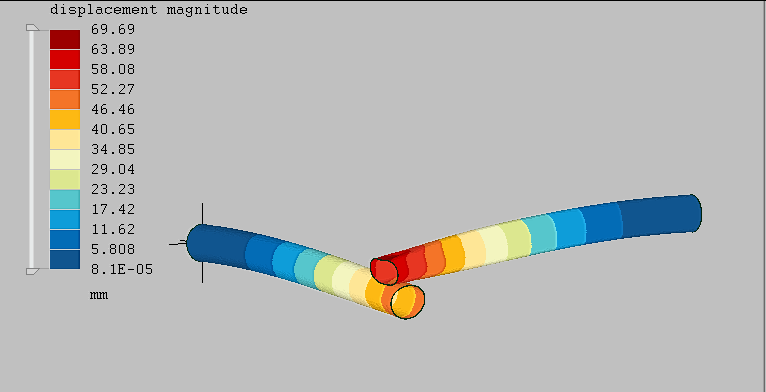
 As you can see, partitioning in FreeCAD is a bit tricky (although somewhat similar to CATIA’s workflow).